
2 reviews across 2 apps 0 unpublished
unable to sync and block calendar
By Wix




Overview
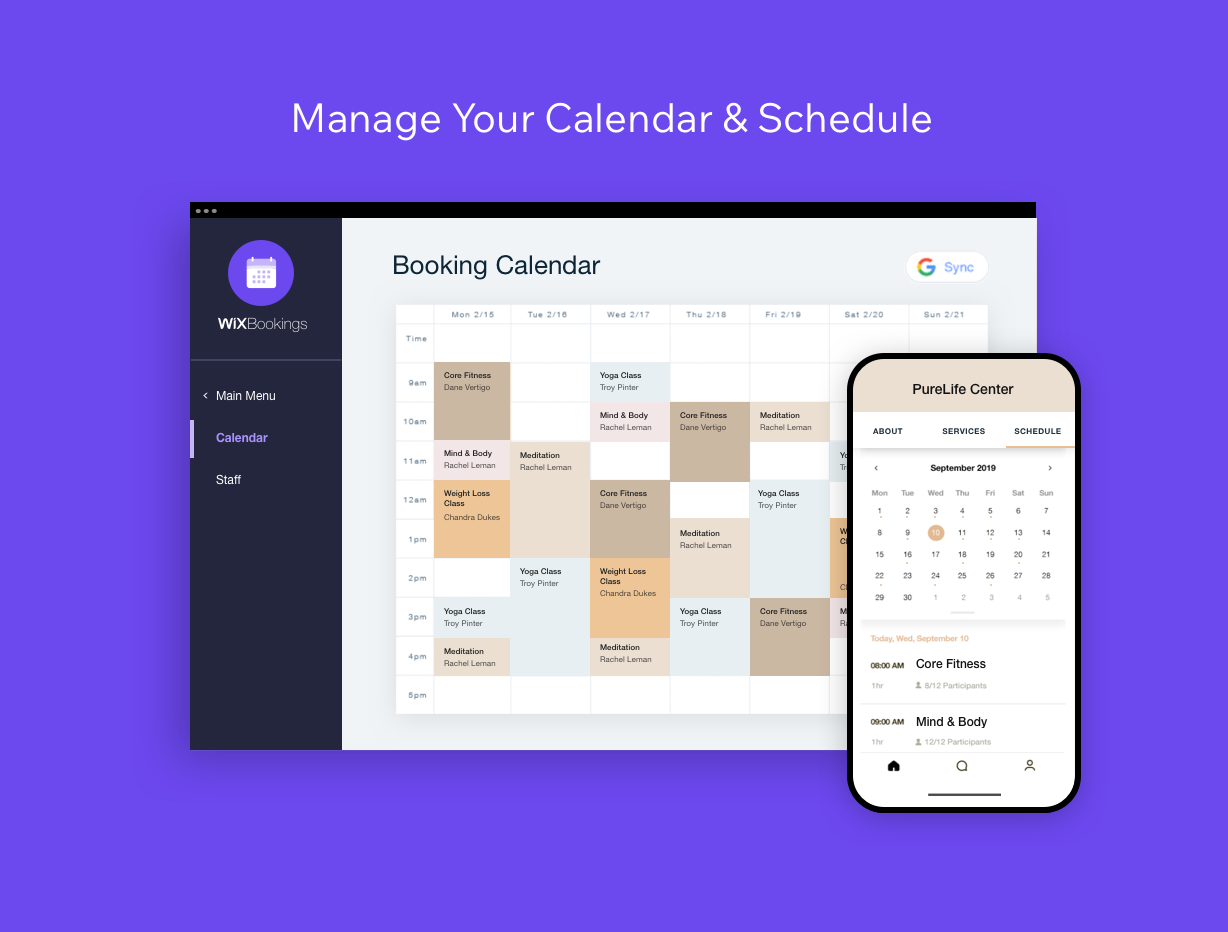
Get the industry-leading scheduling platform to manage your bookings, appointments and calendar—trusted by 11M+ businesses worldwide. - Offer Services: Let clients book 1-on-1 appointments, intro calls, group sessions, classes, workshops and more - Manage All Calendars: Add custom working hours, sync staff Google calendars, include your own booking policy and manage all your schedules from the Wix dashboard - Offer Memberships and Packages: Boost client loyalty with free trials, membership plans, punch cards and coupons - Accept Secure Online/Offline Payments: Get paid with all major credit cards and choose a payment provider, like Wix Payments, PayPal, Stripe and more - Manage Clients: View member profiles, bookings history, payment status, notes and more - Send SMS + Email reminders: Remind clients about upcoming sessions and expiring plans to reduce no-shows - Get a Customized Mobile App: Let clients book and pay for services on the go, chat with other members and stay updated - Track Your Performance: Get detailed analytics on your finances, staff performance and client attendance - Manage on Mobile: Manage your calendar, bookings, clients and sales with the Wix Mobile App
Official Wix marketplace summary
Review activity, rating distribution, stored replies, publication state, and App Market Index review-pattern signals.
Calculated as of
Reviews in selected period
0 0 (percentage unavailable) vs previous 30 days0 Reviews in the selected 30 days and 0 in the previous 30 days.
Analysis pending coverage
Visualize Review volume and rating mix over time, plus Review-pattern activity.
Ratings describe currently preserved Reviews grouped by their original Review dates. Unpublished activity uses surviving Wix-supplied unpublication dates. Switch to Table for exact numbers.
| Month | Reviews | Rating | Unpublished | ||||
|---|---|---|---|---|---|---|---|
| 5 stars | 4 stars | 3 stars | 2 stars | 1 star | |||
| May 2015 | 3 | 1 | 1 | 0 | 0 | 1 | 1 |
| Jun 2015 | 30 | 6 | 7 | 10 | 5 | 2 | 0 |
| Jul 2015 | 42 | 6 | 14 | 13 | 6 | 3 | 5 |
| Aug 2015 | 28 | 2 | 12 | 8 | 2 | 4 | 0 |
| Sep 2015 | 30 | 7 | 11 | 7 | 4 | 1 | 0 |
| Oct 2015 | 22 | 1 | 5 | 7 | 7 | 2 | 0 |
| Nov 2015 | 25 | 1 | 16 | 6 | 1 | 1 | 45 |
| Dec 2015 | 27 | 2 | 10 | 8 | 2 | 5 | 0 |
| Jan 2016 | 44 | 4 | 16 | 11 | 4 | 9 | 51 |
| Feb 2016 | 31 | 3 | 11 | 10 | 3 | 4 | 2 |
| Mar 2016 | 32 | 7 | 9 | 8 | 5 | 3 | 2 |
| Apr 2016 | 22 | 4 | 8 | 4 | 2 | 4 | 20 |
| May 2016 | 28 | 10 | 8 | 8 | 0 | 2 | 44 |
| Jun 2016 | 40 | 5 | 20 | 8 | 4 | 3 | 7 |
| Jul 2016 | 22 | 5 | 8 | 3 | 6 | 0 | 0 |
| Aug 2016 | 34 | 9 | 14 | 3 | 3 | 5 | 20 |
| Sep 2016 | 36 | 4 | 12 | 12 | 1 | 7 | 14 |
| Oct 2016 | 37 | 6 | 15 | 10 | 4 | 2 | 0 |
| Nov 2016 | 26 | 7 | 8 | 4 | 3 | 4 | 22 |
| Dec 2016 | 33 | 9 | 7 | 8 | 4 | 5 | 15 |
| Jan 2017 | 37 | 3 | 12 | 9 | 5 | 8 | 22 |
| Feb 2017 | 45 | 11 | 9 | 6 | 7 | 12 | 3 |
| Mar 2017 | 36 | 9 | 10 | 8 | 6 | 3 | 21 |
| Apr 2017 | 30 | 10 | 10 | 2 | 3 | 5 | 0 |
| May 2017 | 32 | 8 | 12 | 4 | 4 | 4 | 19 |
| Jun 2017 | 46 | 7 | 18 | 7 | 4 | 10 | 0 |
| Jul 2017 | 43 | 6 | 11 | 10 | 6 | 10 | 0 |
| Aug 2017 | 34 | 8 | 6 | 11 | 3 | 6 | 0 |
| Sep 2017 | 34 | 7 | 13 | 7 | 3 | 4 | 9 |
| Oct 2017 | 27 | 8 | 7 | 5 | 4 | 3 | 0 |
| Nov 2017 | 36 | 12 | 10 | 5 | 2 | 7 | 36 |
| Dec 2017 | 26 | 9 | 5 | 4 | 4 | 4 | 0 |
| Jan 2018 | 45 | 15 | 7 | 7 | 8 | 8 | 0 |
| Feb 2018 | 39 | 6 | 11 | 13 | 6 | 3 | 0 |
| Mar 2018 | 46 | 12 | 7 | 13 | 7 | 7 | 0 |
| Apr 2018 | 28 | 10 | 10 | 5 | 2 | 1 | 0 |
| May 2018 | 25 | 6 | 7 | 5 | 4 | 3 | 1 |
| Jun 2018 | 26 | 2 | 7 | 6 | 3 | 8 | 1 |
| Jul 2018 | 16 | 1 | 4 | 4 | 3 | 4 | 0 |
| Aug 2018 | 38 | 8 | 14 | 6 | 4 | 6 | 0 |
| Sep 2018 | 18 | 4 | 6 | 4 | 3 | 1 | 0 |
| Oct 2018 | 18 | 3 | 6 | 6 | 1 | 2 | 0 |
| Nov 2018 | 26 | 3 | 6 | 4 | 6 | 7 | 0 |
| Dec 2018 | 31 | 5 | 12 | 4 | 3 | 7 | 0 |
| Jan 2019 | 24 | 2 | 3 | 4 | 6 | 9 | 0 |
| Feb 2019 | 34 | 4 | 3 | 4 | 5 | 18 | 0 |
| Mar 2019 | 27 | 2 | 8 | 2 | 10 | 5 | 0 |
| Apr 2019 | 11 | 0 | 1 | 3 | 1 | 6 | 0 |
| May 2019 | 24 | 2 | 1 | 3 | 8 | 10 | 3 |
| Jun 2019 | 24 | 0 | 6 | 4 | 4 | 10 | 0 |
| Jul 2019 | 17 | 2 | 2 | 2 | 4 | 7 | 0 |
| Aug 2019 | 26 | 4 | 0 | 6 | 6 | 10 | 0 |
| Sep 2019 | 18 | 0 | 1 | 7 | 5 | 5 | 0 |
| Oct 2019 | 27 | 5 | 6 | 4 | 6 | 6 | 0 |
| Nov 2019 | 17 | 2 | 0 | 5 | 4 | 6 | 0 |
| Dec 2019 | 11 | 0 | 0 | 2 | 4 | 5 | 0 |
| Jan 2020 | 15 | 1 | 1 | 7 | 3 | 3 | 205 |
| Feb 2020 | 24 | 1 | 3 | 4 | 3 | 13 | 0 |
| Mar 2020 | 40 | 4 | 2 | 5 | 4 | 25 | 1 |
| Apr 2020 | 18 | 0 | 2 | 3 | 7 | 6 | 0 |
| May 2020 | 24 | 1 | 5 | 8 | 3 | 7 | 0 |
| Jun 2020 | 46 | 10 | 4 | 8 | 11 | 13 | 3 |
| Jul 2020 | 9 | 1 | 1 | 1 | 4 | 2 | 117 |
| Aug 2020 | 15 | 1 | 4 | 6 | 1 | 3 | 1 |
| Sep 2020 | 15 | 0 | 1 | 6 | 2 | 6 | 0 |
| Oct 2020 | 11 | 0 | 1 | 6 | 2 | 2 | 0 |
| Nov 2020 | 17 | 2 | 6 | 5 | 2 | 2 | 0 |
| Dec 2020 | 13 | 0 | 5 | 3 | 1 | 4 | 0 |
| Jan 2021 | 21 | 2 | 3 | 4 | 6 | 6 | 1 |
| Feb 2021 | 16 | 1 | 5 | 2 | 3 | 5 | 1 |
| Mar 2021 | 19 | 2 | 6 | 3 | 2 | 6 | 4 |
| Apr 2021 | 10 | 1 | 0 | 2 | 6 | 1 | 0 |
| May 2021 | 12 | 2 | 1 | 3 | 2 | 4 | 0 |
| Jun 2021 | 13 | 0 | 2 | 4 | 1 | 6 | 0 |
| Jul 2021 | 14 | 2 | 2 | 4 | 3 | 3 | 0 |
| Aug 2021 | 11 | 2 | 1 | 3 | 3 | 2 | 0 |
| Sep 2021 | 8 | 2 | 0 | 2 | 2 | 2 | 0 |
| Oct 2021 | 9 | 2 | 1 | 2 | 2 | 2 | 0 |
| Nov 2021 | 14 | 0 | 2 | 4 | 4 | 4 | 0 |
| Dec 2021 | 8 | 1 | 2 | 1 | 0 | 4 | 0 |
| Jan 2022 | 17 | 2 | 0 | 7 | 2 | 6 | 0 |
| Feb 2022 | 14 | 1 | 0 | 1 | 4 | 8 | 0 |
| Mar 2022 | 19 | 4 | 2 | 5 | 0 | 8 | 0 |
| Apr 2022 | 9 | 3 | 1 | 1 | 3 | 1 | 0 |
| May 2022 | 14 | 2 | 4 | 0 | 4 | 4 | 0 |
| Jun 2022 | 11 | 3 | 3 | 1 | 2 | 2 | 0 |
| Jul 2022 | 9 | 1 | 1 | 5 | 2 | 0 | 0 |
| Aug 2022 | 8 | 3 | 0 | 2 | 2 | 1 | 0 |
| Sep 2022 | 14 | 1 | 1 | 4 | 5 | 3 | 0 |
| Oct 2022 | 8 | 0 | 0 | 3 | 1 | 4 | 0 |
| Nov 2022 | 17 | 2 | 3 | 2 | 4 | 6 | 87 |
| Dec 2022 | 19 | 4 | 1 | 4 | 5 | 5 | 0 |
| Jan 2023 | 38 | 7 | 1 | 4 | 12 | 14 | 0 |
| Feb 2023 | 12 | 2 | 0 | 3 | 4 | 3 | 0 |
| Mar 2023 | 18 | 1 | 1 | 4 | 5 | 7 | 0 |
| Apr 2023 | 22 | 2 | 0 | 7 | 3 | 10 | 0 |
| May 2023 | 13 | 2 | 2 | 3 | 3 | 3 | 2 |
| Jun 2023 | 16 | 2 | 1 | 3 | 2 | 8 | 0 |
| Jul 2023 | 16 | 1 | 2 | 2 | 4 | 7 | 0 |
| Aug 2023 | 10 | 1 | 1 | 2 | 2 | 4 | 0 |
| Sep 2023 | 11 | 1 | 1 | 0 | 3 | 6 | 0 |
| Oct 2023 | 11 | 2 | 0 | 1 | 1 | 7 | 0 |
| Nov 2023 | 10 | 1 | 0 | 4 | 3 | 2 | 0 |
| Dec 2023 | 10 | 2 | 0 | 4 | 1 | 3 | 0 |
| Jan 2024 | 15 | 0 | 0 | 2 | 3 | 10 | 0 |
| Feb 2024 | 11 | 3 | 1 | 2 | 3 | 2 | 0 |
| Mar 2024 | 13 | 0 | 1 | 3 | 5 | 4 | 0 |
| Apr 2024 | 11 | 1 | 0 | 1 | 2 | 7 | 0 |
| May 2024 | 11 | 3 | 1 | 2 | 4 | 1 | 0 |
| Jun 2024 | 15 | 2 | 0 | 3 | 2 | 8 | 0 |
| Jul 2024 | 10 | 2 | 1 | 1 | 1 | 5 | 0 |
| Aug 2024 | 8 | 2 | 2 | 0 | 2 | 2 | 0 |
| Sep 2024 | 8 | 1 | 0 | 2 | 3 | 2 | 0 |
| Oct 2024 | 11 | 1 | 0 | 2 | 4 | 4 | 0 |
| Nov 2024 | 8 | 3 | 0 | 0 | 2 | 3 | 0 |
| Dec 2024 | 6 | 3 | 0 | 0 | 0 | 3 | 0 |
| Jan 2025 | 16 | 9 | 0 | 2 | 2 | 3 | 0 |
| Feb 2025 | 9 | 2 | 1 | 0 | 1 | 5 | 0 |
| Mar 2025 | 19 | 7 | 0 | 4 | 3 | 5 | 0 |
| Apr 2025 | 7 | 3 | 0 | 1 | 2 | 1 | 2 |
| May 2025 | 13 | 3 | 1 | 1 | 2 | 6 | 0 |
| Jun 2025 | 14 | 3 | 0 | 1 | 0 | 10 | 0 |
| Jul 2025 | 11 | 0 | 1 | 1 | 3 | 6 | 0 |
| Aug 2025 | 8 | 1 | 0 | 2 | 1 | 4 | 0 |
| Sep 2025 | 7 | 1 | 1 | 0 | 2 | 3 | 0 |
| Oct 2025 | 7 | 1 | 1 | 0 | 3 | 2 | 0 |
| Nov 2025 | 4 | 0 | 0 | 0 | 0 | 4 | 0 |
| Dec 2025 | 6 | 1 | 2 | 1 | 0 | 2 | 0 |
| Jan 2026 | 5 | 0 | 1 | 0 | 0 | 4 | 0 |
| Feb 2026 | 8 | 2 | 0 | 0 | 1 | 5 | 0 |
| Mar 2026 | 6 | 0 | 0 | 0 | 1 | 5 | 0 |
| Apr 2026 | 3 | 1 | 0 | 1 | 0 | 1 | 0 |
| May 2026 | 4 | 1 | 1 | 0 | 1 | 1 | 0 |
| Jun 2026 | 2 | 0 | 0 | 0 | 0 | 2 | 158 |
| Jul 2026 | 4 | 2 | 0 | 0 | 0 | 2 | 0 |
Review-pattern Timeline data is pending complete coverage.
App Market Index archive
These are preserved App Market Index Review rows. They are separate from the current official Wix marketplace summary shown above, and publication labels describe the state currently stored by App Market Index. About this archive
I had to update once, only may add 5 properties and of the 5 properties no way to import icals. The app is absolutely useless, do not download and waste your time. Wix is not made for hotels or rentals...
2 reviews across 2 apps 0 unpublished
unable to sync and block calendar
18 reviews across 18 apps 10 unpublished
Perfect!
Love it
Great App !
Great app love it!
great
Showing 5 of 17 other reviews.
View all reviews by this reviewerThank you so much - we're really glad Wix Bookings is working well for you!
1 reviews across 1 apps 0 unpublished
No other stored Reviews for this reviewer.
I have added this app to lots of clients sites it it has been really successful.
Thank you, that's great to hear! We love that it's working well across your client sites. Appreciate you recommending it.
6 reviews across 6 apps 1 unpublished
Excellent support
Trying to find examples
Free plan looks awful
Please fix this.
Works really well.
When I sync my bookings calendar all of the available appointments are showing on my phone calendar and not just the appointments that are booked. I only want the appointments that have been booked to come through to my phones calendar. I do not see where I can only sync my bookings and not the entire calendar. Is it something im missing? Help
Hi, The sync brings your actual Wix Bookings sessions into your personal calendar - open/available slots shouldn't sync, only real booked sessions and blocked time. If empty available slots are showing on your phone, it's worth re-checking the sync direction/settings: https://support.wix.com/en/article/wix-bookings-about-syncing-personal-calendars-with-wix-bookings . If it persists, contact us and we'll look at your account: https://www.wix.com/contact .
1 reviews across 1 apps 0 unpublished
No other stored Reviews for this reviewer.
The layout and presentation makes it almost impossible to get anyone to book a service with this layout and lack of upfront information. It is just downright horrible and inflexible. I am looking for better alternatives, or a new hosting platform if I can't find one.
Hi, Thank you for sharing such honest feedback, and I’m really sorry to hear how disappointing the layout and lack of upfront information feels for you. While Wix Bookings has some customization options, we know it can still feel inflexible in terms of layout and how information is presented. You can adjust what information you collect from clients using the booking form: https://support.wix.com/en/article/wix-bookings-customizing-booking-form-fields You can also review and tweak your service list setup here: https://support.wix.com/en/article/wix-bookings-setting-up-your-service-list More advanced layout changes (especially on mobile) are a known limitation and an active request: https://support.wix.com/en/article/request-customizing-mobile-layout-of-wix-bookings We really appreciate you taking the time to tell us this, and we’re sorry it’s made you consider alternatives. Best, Wix Bookings team
3 reviews across 3 apps 0 unpublished
WhAPPS up with this!
Not really!
1 reviews across 1 apps 0 unpublished
No other stored Reviews for this reviewer.
Happy to hear :) Thanks for sharing!
1 reviews across 1 apps 0 unpublished
No other stored Reviews for this reviewer.
I just wanted to add a calendar for booking but it adds pricing and a lot of options I dont need I just need a simple calendar thats it
Hi there, Thanks for sharing your feedback with us! You have a few options to show only calendar for booking: 1) You can use the appointment field in Wix Forms, here is how: https://support.wix.com/en/article/wix-forms-scheduling-appointments-through-your-form 2) You can display a booking calendar without showing prices by setting the service price to 0 or leaving it blank. Here are the steps: https://support.wix.com/en/article/create-an-appointment-without-a-price-display-in-wix-bookings. You can also use the Calendar Widget in this option (in the Editor go to the Add Panel > Bookings > Booking Elements > Calendar widget) Hope it helps!, Wix Bookings team
1 reviews across 1 apps 0 unpublished
No other stored Reviews for this reviewer.
This Booking app subscription is almost impossible to unsubscribe too and to close your WIX account! Stay away from Bookings...
Hi, Thank you for sharing your feedback, and we’re sorry for any frustration. You can remove Wix Bookings from your site by following these steps: https://support.wix.com/en/article/wix-bookings-deleting-wix-bookings. If you’d like help with your subscription or closing your account, our support team is always here: https://www.wix.com/contact Thank you for letting us know your experience—we’re always working to make things easier. Best, Wix Bookings team
4 reviews across 4 apps 0 unpublished
great App
Nice App
Great App
The current limit is 8, please increase to at least 12
Hi there, Thanks for your feedback, we're always looking to improve our product, our team will try to priorities this request soon! Stay tuned :) thakns, Wix Bookings team
1 reviews across 1 apps 0 unpublished
No other stored Reviews for this reviewer.
Thanks a lot for your great feedback, we're really happy you like it! Best, Wix Bookings team
3 reviews across 3 apps 0 unpublished
Lexahaus
Lexahaus
Wix bookings can not set up appointments for clients that meet twice per week or even 3 times, etc., that repeat. If setting up a client that meets twice per week on one of the days can be repeated, and it has to be done individually... Like Tuesday and Thursday should customize to reapeat as many weeks as desired. Unfortunately Wix can not do this. Useless
Hi, Thank you for your feedback. We understand the need to set up recurring appointments on multiple days per week, and we’re aware this isn’t currently supported. It’s a known limitation and something we’re considering for future improvements. We really appreciate you taking the time to share this - it helps us better understand our users’ needs and prioritize accordingly. Best regards, Erez from the Wix Bookings Team
1 reviews across 1 apps 0 unpublished
No other stored Reviews for this reviewer.
Can this be added to booking form? And how?
Use a Wix Custom Form (Wix Forms or Velo Custom Form) You can: Create a custom form using Wix Forms or Velo by Wix that includes a file upload field. Add this form on a separate page or after booking confirmation. Include a link to the form in: The booking confirmation message An email sent after booking The booking page itself (above or below the booking widget) This allows your users to complete their booking, then upload a file via your custom form.
1 reviews across 1 apps 0 unpublished
No other stored Reviews for this reviewer.
Ive tried deleting this app multiple times! its becoming frustrating WIX you need to design your web app to be user friendly for those that are designing there websites please rectify the problem
Hi there, Thanks for reaching out with this feedback, I’m sorry to hear about your frustration and would like to help with this issue. You can easily delete an app that you’ve added to your site by going to the dashboard menu > manage apps > and in the 3 dot menu you will find the “delete” option. If you need further instructions you can also read this Wix help center article on how to delete apps from both your dashboard and site. https://support.wix.com/en/article/deleting-apps?tabs=Studio-Editor#deleting-an-app-added-only-to-your-sites-dashboard If there’s anything else we can help with please feel free to reach out, Shahar from the Wix Bookings team
1 reviews across 1 apps 0 unpublished
No other stored Reviews for this reviewer.
I want to remove the booking system from the site but it won't let me. It's very difficult to remove things if you change your mind.
Hi there, Thanks for reaching out, I’m sorry to hear about your frustration. You can easily delete an app that you’ve added to your site by going to the dashboard menu > manage apps > and in the 3 dot menu you will find the “delete” option. On the editor you can also delete specific booking-related pages directly from the “Site Pages and Menu” panel by. Clicking on your “booking pages” and deleting them individually from more actions (3 dot) menu. If you need further instructions you can also read this Wix help center article on how to delete apps from both your dashboard and site. https://support.wix.com/en/article/deleting-apps?tabs=Studio-Editor#deleting-an-app-added-only-to-your-sites-dashboard If you could provide us with some feedback on why the bookings app is not suitable for your needs, it would be greatly appreciated. Here is a link to where you can provide the feedback https://wixbookings.wixsite.com/bookingsfeedback. Thanks, Tal from the Wix Bookings Team
1 reviews across 1 apps 0 unpublished
No other stored Reviews for this reviewer.
Le bouton pour le réserver ne peut pas être personnalisé par chaque service. C'est dommage
1 reviews across 1 apps 0 unpublished
No other stored Reviews for this reviewer.
I will like my visitor to make a RSVP and view the availability slot or calendar from my site. The idea is to let my visitor choose their preferred date/time, our staffs will received the reservation and called back to confirm with the customer. We don't plan to keep any sensitive information like (credit card details) in our website. Thus we don't need our customer to make online purchase. Is it possible for my visitor to make a RSVP without having to create an account?
2 reviews across 2 apps 0 unpublished
Easy to install
It's been nothing but reliable for me. Recently though I keep getting an error message saying; We're unable to display available time slots. Please refresh the screen or try again later. I'm trying to figure out what's going on but otherwise, it's a great app.
Hi pvcjmiler, I’m very sorry to hear you’ve been experiencing issues with the app displaying available time slots. I’ll be sure to bring this to our team’s attention to investigate further and address the issue as soon as possible. Thanks for your patience and understanding, and we’re glad to hear that, aside from this, the app has been reliable and useful for you. If you encounter any other issues or have questions in the meantime, please let me know—I’m here to help. Best regards, Ari Wix Bookings Team
1 reviews across 1 apps 0 unpublished
No other stored Reviews for this reviewer.
Why can't I add multiple slots charge all at one transaction?
Hi, librayeung7 Thank you for your inquiry about adding multiple slots and charging for them in a single transaction. I’m pleased to inform you that this is possible using Wix Bookings’ multi-service appointment feature. This allows clients to book up to five different services within a single appointment, streamlining the scheduling and payment process. For detailed instructions on setting up and managing multi-service appointments, please refer to our support article: https://support.wix.com/en/article/wix-bookings-scheduling-and-managing-multi-service-appointments If you have any further questions or need assistance implementing this feature, feel free to reach out to Support. Best regards, Ari Wix Bookings Team
1 reviews across 1 apps 0 unpublished
No other stored Reviews for this reviewer.
I offer first aid courses with a maximum of 20 students. In booking, customers can see that there are available places, but they cannot see how many places are left.
Hi, Thank you for your feedback regarding displaying the number of remaining spots in your first aid courses. Currently, Wix Bookings allows displaying available spots for classes through the Class Timetable feature. https://support.wix.com/en/article/request-displaying-available-spots-for-classes-in-wix-bookings However, this functionality is not yet supported for courses. We understand the importance of this feature and have added your request to our backlog for future consideration. Please let us know if there’s anything else we can assist you with. Best regards, Ari Wix Bookings Team
1 reviews across 1 apps 0 unpublished
No other stored Reviews for this reviewer.
I would like to have an option were you book travel packages , there is no option for that, i have specify time when i have packages booked for days, some provision should be there for that as well
Hi backyardofpraneshp, Thank you for sharing your feedback regarding booking multi-day travel packages. We’re aware of this request, and you’re welcome to vote for it here: https://support.wix.com/en/article/wix-bookings-request-creating-a-multi-day-service Please let me know if this addresses your question or if there’s anything else I can assist you with. Best regards, Ari Wix Bookings Team
1 reviews across 1 apps 0 unpublished
No other stored Reviews for this reviewer.
Ik zit vast met de module van wix.
You might find this article helpful: How to Make a Vacation Rental Website. https://www.wix.com/blog/how-to-make-a-vacation-rental-website It covers everything you need to set up an online booking page for your vacation home. If you have any specific questions, let us know, we're happy to help!
1 reviews across 1 apps 0 unpublished
No other stored Reviews for this reviewer.
Along with another user below, the most recent one. I Cant get the services page (booking service one) to show up on my site, as well when I navigate to it using the backend, what does show up s nothing that I put in when populating the fields on the dashboard. please help
Hi, this is Osher from the Bookings team. Thank you so much for sharing your feedback – we really appreciate it! First, to help you with the service page visitability issue, you can add it to your menu: Double-click the menu > Select "Add Menu Item" > Choose "Link" > "Page" > From the list, select "Service Page" to add it to your menu. Second, as for the service display, please note that services don't appear in the editor mode. However, you can preview how they will look on your website by clicking the "Preview" button in the top right corner of your screen before publishing. If you're still having trouble, don’t hesitate to reach out – we’re here to help! :)
1 reviews across 1 apps 0 unpublished
No other stored Reviews for this reviewer.
I'm really frustrated that I can't use Apple Pay at the old built-in stores. Is there any way to change the payment settings page?
Hi, this is Bar from the Wix Bookings team. I'm sorry that you didn't find the payment option you were looking for. Can you please elaborate on which exact option you were missing?
1 reviews across 1 apps 0 unpublished
No other stored Reviews for this reviewer.
I have set up my booking form ok but there is no payment method available other than sending an invoice for payment. How do I add the pay now by credit card or PayPal option on the cart page?
Hi Lisa, Asaf from Wix bookings here. You can enable all these payment options. You would have to enable Getting paid (with Credit card, PayPal and others), and then connect your withdrawal account details. You can find detailed instructions here: https://support.wix.com/en/article/wix-bookings-about-getting-paid-online. All the best, Asaf
1 reviews across 1 apps 0 unpublished
No other stored Reviews for this reviewer.
I had an issue with this application and tried calling WIX customer service. I was put on hold twice and the call dropped both times. Still don't have an answer and now very frustrated.
Hi, this is Carmel from the Wix Bookings team, I'm sorry to hear about your experience. That’s definitely not the experience we want for our users. I’ve just sent you a personal email so I can better understand the issue and assist you directly. Carmel and the Wix Bookings team
1 reviews across 1 apps 0 unpublished
No other stored Reviews for this reviewer.
I have travel agency but there is no option to add itinerary and I don't want appointment
Hi Yatrify, this is Tal from Wix Bookings :) What you can do to add an itinerary it to add it to the service page. Instead of directing your clients directly to the calendar page where they can set up appointments, you can first have them land on the service page where you can add information about the trip, including the itinerary. You can set this up by going to the settings panel on your service list, and in the display tab choose the option of directing the clients to the service page instead of the bookings calendar when clicking on the service name or image. I hope this was helpful, Tal and the Wix Bookings team
1 reviews across 1 apps 0 unpublished
No other stored Reviews for this reviewer.
I just read some reviews, and it seems like more of a hassle than it is helpful I was looking to have a free integration to help schedule intro calls with potential clients and customers.
Hi Jason, this is Tal from Wix Bookings :) Scheduling intro calls should be a fairly easy set up when using bookings, you can create one or a few (even free) services regarding these calls and open up your schedule for your clients to sign up. The bookings app has far more complex abilities, of course, but this should be easily manageable. I hope this was helpful, Tal and the Wix Bookings team
1 reviews across 1 apps 0 unpublished
No other stored Reviews for this reviewer.
I cant use it and now I cant delete it or the page its on! I am stuck with a useless app with no way to get rid of it on the site.
Hi Jan, this is Tal from Wix Bookings :) I'm sorry to hear that you are having trouble with the bookings app, but you can easily delete it from the backoffice. Go to the main menu > apps > manage apps > scroll down to the bookings app under "Installed Wix Business Solutions" > and in the 3 dot menu you will see "delete". This should delete the app from your site and remove all of it's connected pages. I hope this was helpful, Tal and the Wix Bookings team
1 reviews across 1 apps 0 unpublished
No other stored Reviews for this reviewer.
Hello Wix team, I want a calendar on my site in order for my client to book a timeslot for an intro call. However all services listed are paid services, I don't want to charge my client for an intro call. Do you have this feature on Wix? Looking forward to your help, thank you.
Hi there, this is Tal from Wix Bookings :) You can easily set up an intro call service to be free from the service page in the back office. If you go into Catalogue in the main menu > Booking Services > choose one of your services and open the service form, under the price and payment section you can open the price type dropdown and select the "Free" option, which will then not show any price on that specific service on your site. I hope this was helpful, Tal and the Wix Bookings team
1 reviews across 1 apps 0 unpublished
No other stored Reviews for this reviewer.
Is there a way to create add-on services with no time requirement? I’m a massage therapist and I don’t want to have 15 services listed in order to have add-ons like aromatherapy or cupping. Those things don’t really add time to a service, but I want customer to be able to enhance their basic massage options.
Hi, Thank you for sharing your feedback. We appreciate your insights on add on needs. I’m happy to share that we are currently working on enabling add-on services options. In the meanwhile you can add dynamic pricing to your services, change the price type to Varied prices and add custom price to any option you would like to modify the service. Your input is invaluable in helping us enhance our features. If you have any more suggestions or need assistance, please feel free to reach out. We’re here to help! Shani, Wix Bookings Team
1 reviews across 1 apps 0 unpublished
No other stored Reviews for this reviewer.
how do i add an external email adres to the booking app, not my wix email...a different created booking form email?
Hi, this is Shani from Wix Bookings :) I’ve sent you a personal email because we would love to hear more details about the problem you encountered. Looking forward to your response via email, Shani and the Wix Bookings team
1 reviews across 1 apps 0 unpublished
No other stored Reviews for this reviewer.
hello, im trying to subscribe with a wix booking plan and unfortunately after signing in, im always being taken to the wix studio plan and not the booking plan.
Hi, this is Shani from Wix Bookings :) I’ve sent you a personal email because we would love to hear more details about the problem you encountered. Looking forward to your response via email, Shani and the Wix Bookings team
1 reviews across 1 apps 0 unpublished
No other stored Reviews for this reviewer.
Hi, in my checkout I have client form, client details, customer details and billing adress. It's to much form for my client to fill. how can I delete 2 of them and stay only with the billing adress? and how can my clients her appointment self cancel or reschedule on the website? and my business is in Curacao. we don't have postcode, country etc
1. Simplifying the Checkout Form You can customize the form fields in your checkout process to remove unnecessary sections. Go to your Wix Dashboard. Navigate to Settings > eCommerce Settings > Checkout Settings (or Bookings Settings if it's specific to appointments). Edit the form fields as needed. Save the changes. 2. Allowing Clients to Cancel or Reschedule Appointments You can enable self-service for your clients to cancel or reschedule appointments by activating the feature in Wix Bookings: In your Wix Dashboard, go to Bookings Settings > Advanced Settings. Enable Allow Clients to Cancel or Reschedule Appointments. Set your cancellation/rescheduling policy (e.g., how many hours/days before the appointment they can make changes). 3. Business location Wix allows you to customize address fields for regions without postcodes or specific country fields. Go to Settings > Regional Settings in your dashboard. Adjust the fields to make them optional or remove them entirely.
1 reviews across 1 apps 0 unpublished
No other stored Reviews for this reviewer.
Bonjour, je voudrais savoir si je peut avoir plusieurs collaborateurs qui travaillent avec moi le service de réservation et que chacun puisse avoir sa propre synchronisation avec son compte Zoom mais aussi recevoir l'argent de ses réservations sur son propre compte bancaire sans que cela passe tout par ma propre comptabilité ?
Currently, Wix Bookings allows you to add multiple team members (collaborators) to your booking system. Each team member can sync their own Zoom account for their online meetings. However, at this time, payments for bookings are processed through a single account associated with your business, and there isn't a built-in option to split payments directly between different collaborators or send payments to separate bank accounts automatically.
1 reviews across 1 apps 0 unpublished
No other stored Reviews for this reviewer.
Hello, how do I delete the Wix Booking app? I have a external website link that I have connected to my website that brings them to my booking page. Wix wants me to fill out my SEO for my services page, but I simply don't want to use the wix booking service page and I can't delete it without deleting this app.
Hi, this is Avner from the Wix Bookings team. I'm sorry you've decided not to use the Bookings app. If you want to delete the bookings app, you can follow these instructions: https://support.wix.com/en/article/wix-bookings-deleting-wix-bookings?tabs=Wix-Editor If you want to use the app without filling in the SEO for your service page - you can certainly do it. Filling SEO information is totally optional. Avner
1 reviews across 1 apps 0 unpublished
No other stored Reviews for this reviewer.
Wix ile tasarladığım Basit ama kullanışlı bir Sosyal Arkadaşlık & Topluluk platformu kurdum arkadaşlar. Ücretsiz üye olabilirsiniz. Bazı eksiklikler var ama inşallah yakın zamanlarda tamamlarım diye düşünüyorum. Paralı sitelere inat kurdum bunu :D :D https://sosyaleglence.wixsite.com/sosyaltopluluk
Thanks for choosing Wix! Best regards, Wix Bookings Team
37 reviews across 37 apps 2 unpublished
AL CHAT
Güzel
heyy .....
HELLO :)))
????
Showing 5 of 36 other reviews.
View all reviews by this reviewer-
Thanks for your feedback! Best regards, Wix Bookings Team
1 reviews across 1 apps 0 unpublished
No other stored Reviews for this reviewer.
Thank you so much for your review! We're thrilled to hear that you're enjoying the Bookings app. Your support inspires us to keep delivering our best! Lior, Wix Bookings Team
3 reviews across 3 apps 0 unpublished
Amazing!
WOW!
We love wix bookings....would love to see the seating chart like you can get with events, but with bookings. This will be a game-changer for things like Spin classes.
Hi, thank you for your feedback and for your enthusiasm for Wix Bookings. We will definitely take this into consideration for our future plans. Let me know if I can help with anything else. Nati, Wix bookings team
1 reviews across 1 apps 0 unpublished
No other stored Reviews for this reviewer.
The wix booking plug in works fine on laptop and leads me to the checkout page where i can pay but when i schedule an appointment through the mobile booking calendar it takes me to a page that says we can't find what you are looking for! PLEASE HELP!
Hi, this is Bar from Wix Bookings :) I’ve sent you a personal email because we would love to hear more details about the problem you encountered. In the meanwhile, I suggest to to use Bookings Service List element instead of the text boxes following the instructions here: https://support.wix.com/en/article/wix-bookings-setting-up-your-service-list Hope this helps and looking forward to your response via email, Bar and the Wix Bookings team
1 reviews across 1 apps 0 unpublished
No other stored Reviews for this reviewer.
I wish I could differentiate the types of bookings so that I can change the time limit for people to book. I want my one on one clients to book 24 hours in advance but I want people to be able to book into classes right up until the last minute. Instead they are both lumped together and I'm constantly having to add people to my classes as they missed the 24 hour cut off period. It's a lot of extra work.
Hi, this is Carmel from the Wix Bookings team, I’m happy to let you know that you can set different booking policies for each of your services. To do this, go to Bookings Settings -> Booking Policies -> Add a new policy. Then, head to your Service Catalog, select the relevant service -> Edit -> scroll down to Booking Preferences, and apply the new policy. Hope this helps, Carmel and the Wix Bookings team.
1 reviews across 1 apps 0 unpublished
No other stored Reviews for this reviewer.
Hi Lucas, Thanks a lot for the feedback, we're glad you love the app Best, Wix Bookings team
3 reviews across 3 apps 1 unpublished
Slecht
Nuttig
this app still doesnt offer a counter. please address this issue. when students book a spot in my limited seating classes, I need them to be able to see how many seats/spots/openings are remaining.
Thank you for your feedback. The remaining seats are displayed on your site in the daily agenda or the weekly time table, do you need it displayed in other places in the site? For more details, see this article: https://support.wix.com/en/article/wix-bookings-displaying-class-times-on-your-site
1 reviews across 1 apps 0 unpublished
No other stored Reviews for this reviewer.
Good app
Thanks for your review! We're happy to hear you're enjoying Wix Bookings. All the best, Sam
8 reviews across 8 apps 0 unpublished
Good App
Good app
Good app
Great app
Good app
Showing 5 of 7 other reviews.
View all reviews by this reviewerI need a property rental app that allows property listing, booking and payment of the rental facilities directly on my website. Any recommendations please?
Hi! I'm Sam from Wix Bookings, thanks for reaching out. Based on what you need, I'd like to direct you to some other apps you get can on the Wix app market. Try out Twice Rentals and Wix Hotels for your needs! All the best, Sam
1 reviews across 1 apps 0 unpublished
No other stored Reviews for this reviewer.
We need more features like Calendally, this will immensely help with scheduling recording sessions for podcasts and videocasts. It is currently heavily focused on Location based Service Offerings.
Hi, Thank you for reaching out to us, we truly appreciate your feedback and constantly working in order to improve and release new features! Best, The Wix Bookings Team
1 reviews across 1 apps 0 unpublished
No other stored Reviews for this reviewer.
I like this app. My only suggestion would be to add a feature to let you accept or decline bookings before they are final.
Hi, We are delighted to hear your feedback In regards to your suggestions, we have a pending approval option in the service form. Best, Ophir from Wix Bookings
1 reviews across 1 apps 0 unpublished
No other stored Reviews for this reviewer.
It's been pretty good so far and is super integrated. Only now there are two forms in the booking process, first the old one that goes with bookings and then another for online payment! This appears to be the "new checkout". This is very confusing for customers and is unnecessarily cumbersome. The data from form 1 is not transferred to the new form 2 either! And of course the old problem with the telephone country code, which is ALWAYS set to the USA, would be better if it was set to my own country, and is also cumbersome and annoying to set with the smartphone.
Hi, First of all thank you for your feedback , this always help us to improve our product. I am glad to inform that a new country code component has now been released and the country code is now automatically prefilled based on regional settings . Regarding your concern about the booking flow, note that logged in users now see the information filled in the booking form automatically transferred to the checkout form. We are aware that this is not the case for non-logged in users and are working on a solution for this as well. Hope this helps, Thanks, Wix booking team
1 reviews across 1 apps 0 unpublished
No other stored Reviews for this reviewer.
Plan comparison
Detailed plan information is not available for this App.