
Google Calendar
- Verified by Wix
- Wix Related App
Product media
Screenshots
1 of 3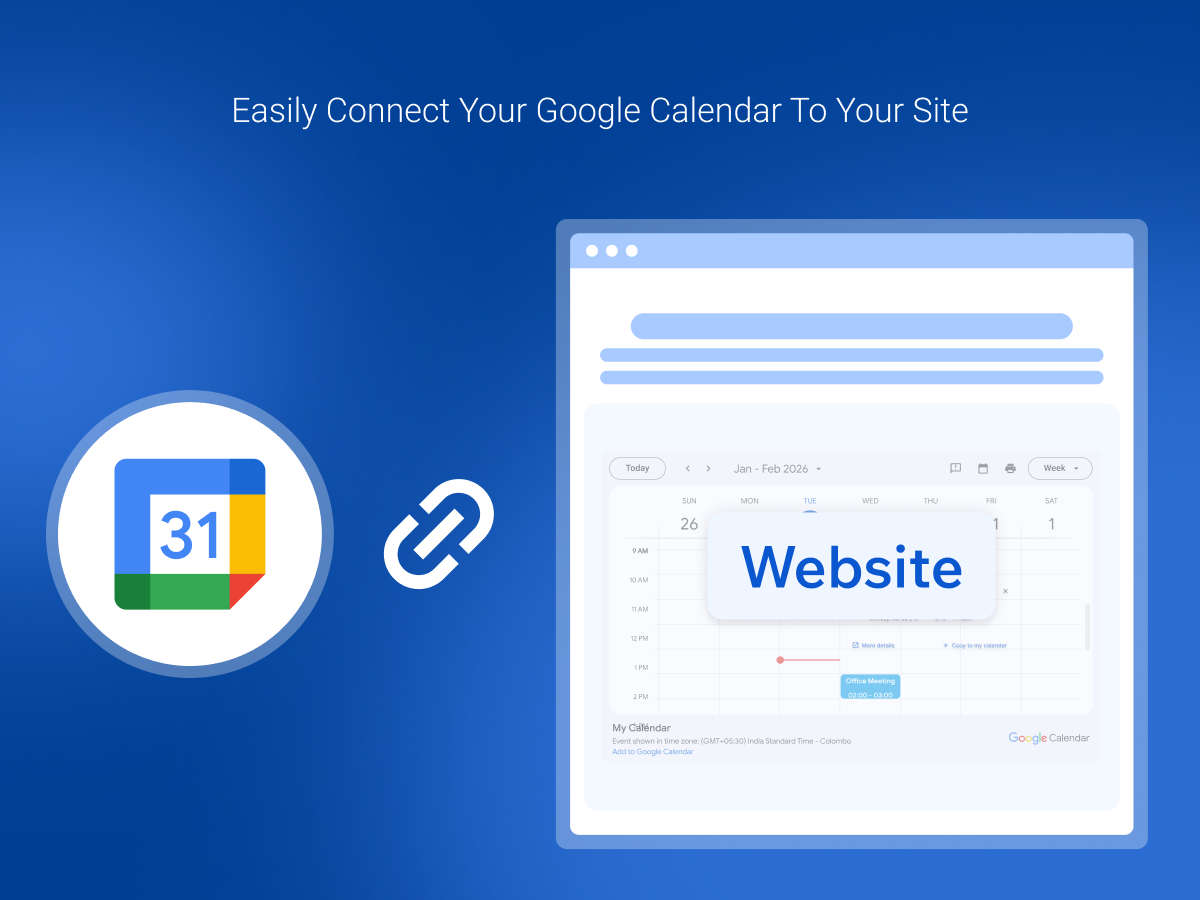
Overview
About this App
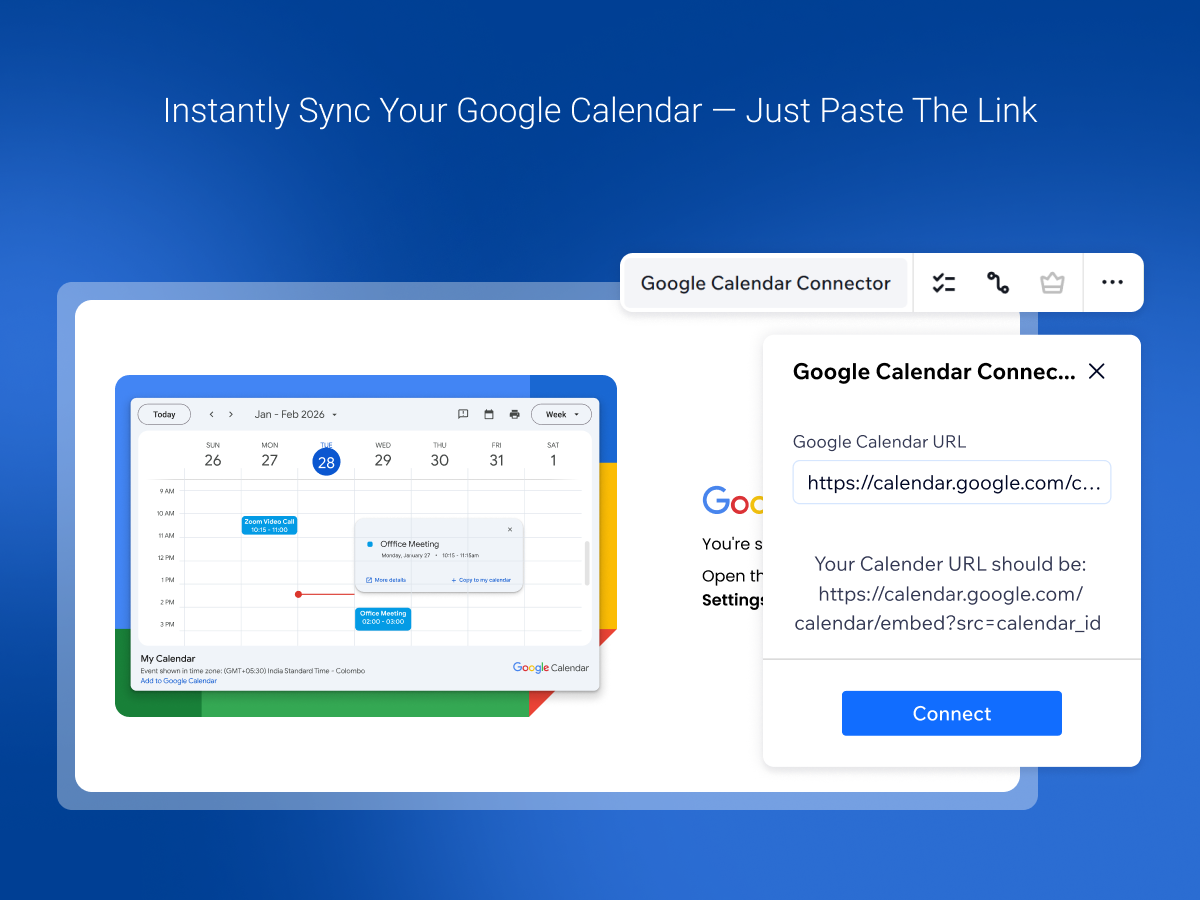
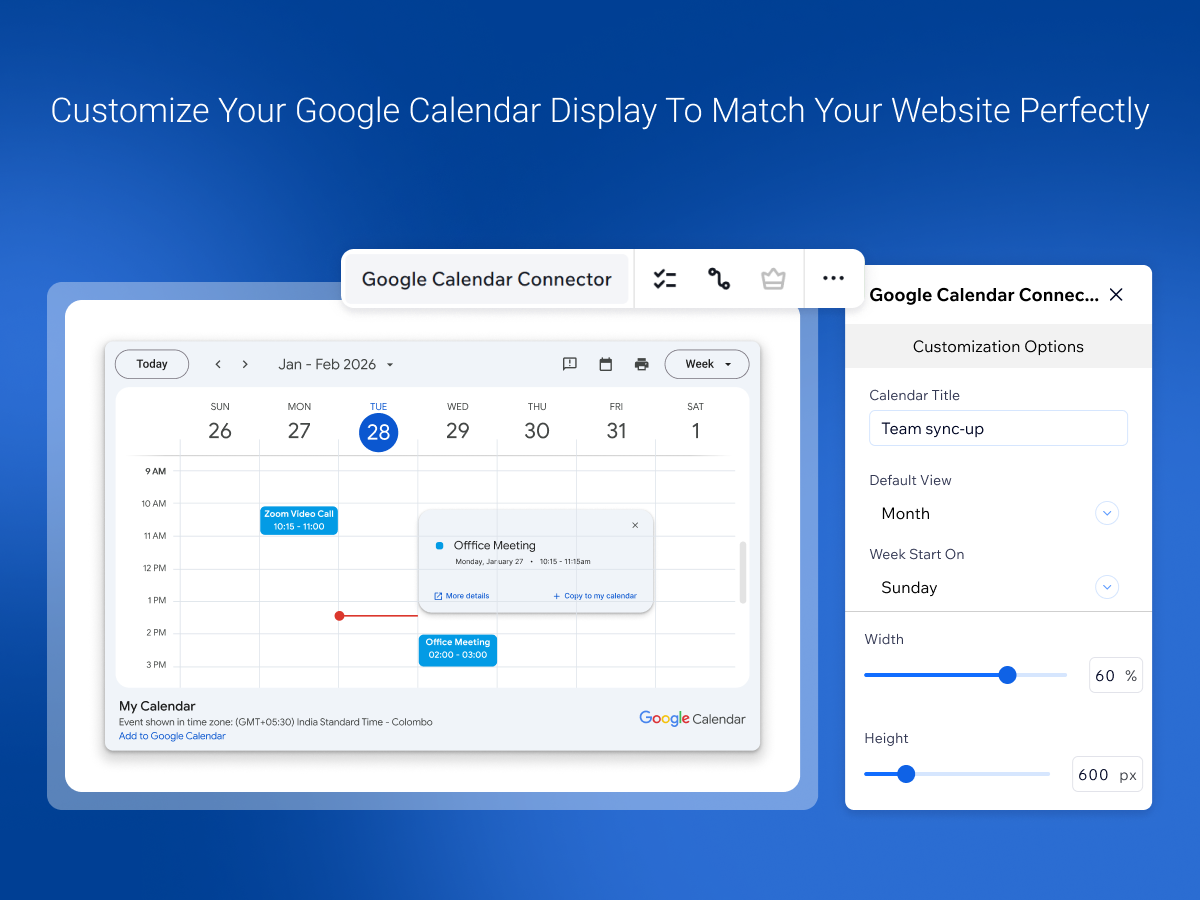
Show your Google Calendar on your site so visitors always know what is coming up. Paste the link of a public Google Calendar and your events calendar appears on the page. Events you add or change in Google Calendar show up on your site, with no extra work for you. Choose the view that suits your audience: a month view, a week view or a schedule of upcoming events. Give the calendar your own title, pick the day the week starts on and set its size to suit your page. Running more than one calendar? Add several Google Calendars and show them together in one place. It works for business schedules, event planning and personal agendas alike. No coding is needed: connect your calendar once and keep managing everything in Google Calendar, the way you already do.
What the listing highlights
- Easy Calendar Embedding: Instantly embed your Google Calendar with a simple URL
- Customizable Views: Choose from week, month, or schedule views for a personalized display
- Smart Display Options: Set start days, titles, and layout to match your needs
- Responsive & Fast: Optimized for all devices to ensure a smooth experience
Additional product media
Promotional media
Reviews
Official Wix marketplace summary
Wix Marketplace feedback
Review intelligence
App Market Index summaries derived from currently preserved Wix Review rows. The selected period affects only Review activity and Ratings; replies, publication state, and Review patterns describe the overall preserved dataset.Review activity, rating distribution, stored replies, publication state, and App Market Index review-pattern signals.
Calculated as of
Review activity
Reviews whose original Wix Review date falls in the selected elapsed-day period, compared with the immediately preceding equal period. Each paired bar represents the same relative part of both periods.Reviews in selected period
0 −27 (−100%) vs previous 30 days0 Reviews in the selected 30 days and 27 in the previous 30 days.
Stored replies
Reply coverage is the percentage of 144 preserved Reviews with at least one stored reply. Median and P75 use 73 Reviews with valid dated stored replies. Reply authorship is not inferred.Stored publication state
Current stored state across 144 preserved Reviews. A Review may remain preserved after it is no longer published by Wix.- Published
- 98 68.06%
- Unpublished
- 46 31.94%
- Unknown
- 0 0%
Review pattern signals
Automated App Market Index classifications, not proof of manipulation. Ordinary strength uses published 5-star Reviews. Suspicious unpublished is a separate signal for stored unpublished 5-star Reviews; an App can carry both kinds of evidence.Analysis pending coverage
Review timeline
Visualize Review volume and rating mix over time, plus Review-pattern activity.
- Active months
- 16
- Peak Review month
- Nov 2025 · 39
Review volume
Reviews are grouped by original Wix Review month. Rating colors use each Review's currently stored rating. Hover a column for exact monthly counts.Review intelligence over time
Each lane has its own scale so low-volume evidence remains visible. Hover a mark for the exact monthly count. Pattern classifications describe current stored analysis grouped by original Review month.Ratings describe currently preserved Reviews grouped by their original Review dates. Unpublished activity uses surviving Wix-supplied unpublication dates. Switch to Table for exact numbers.
Timeline data table
| Month | Reviews | Rating | Unpublished | ||||
|---|---|---|---|---|---|---|---|
| 5 stars | 4 stars | 3 stars | 2 stars | 1 star | |||
| May 2025 | 1 | 0 | 0 | 0 | 0 | 1 | 0 |
| Jun 2025 | 1 | 0 | 0 | 0 | 0 | 1 | 0 |
| Jul 2025 | 3 | 3 | 0 | 0 | 0 | 0 | 0 |
| Aug 2025 | 2 | 2 | 0 | 0 | 0 | 0 | 0 |
| Sep 2025 | 4 | 3 | 0 | 0 | 0 | 1 | 0 |
| Oct 2025 | 1 | 1 | 0 | 0 | 0 | 0 | 0 |
| Nov 2025 | 39 | 10 | 4 | 4 | 7 | 14 | 0 |
| Dec 2025 | 26 | 8 | 4 | 0 | 2 | 12 | 0 |
| Jan 2026 | 14 | 12 | 1 | 0 | 0 | 1 | 0 |
| Feb 2026 | 5 | 4 | 0 | 0 | 0 | 1 | 0 |
| Mar 2026 | 5 | 4 | 0 | 0 | 1 | 0 | 0 |
| Apr 2026 | 8 | 6 | 0 | 0 | 0 | 2 | 0 |
| May 2026 | 5 | 4 | 1 | 0 | 0 | 0 | 0 |
| Jun 2026 | 1 | 1 | 0 | 0 | 0 | 0 | 46 |
| Jul 2026 | 2 | 1 | 0 | 0 | 0 | 1 | 0 |
| Aug 2026 | 27 | 5 | 0 | 3 | 1 | 18 | 0 |
Review-pattern Timeline data is pending complete coverage.
App Market Index archive
Review list
Browse preserved published and unpublished Reviews.These are preserved App Market Index Review rows. They are separate from the current official Wix marketplace summary shown above, and publication labels describe the state currently stored by App Market Index. About this archive
App Market Index Review-pattern filters are pending complete coverage.
Show other reviews by reviewerThese Reviews were previously observed by App Market Index and Wix later supplied an unpublished state for them.
- info9667172Unpublished
Useless
The free version is locked down so much that it's useless. They want you to buy a monthly plane, even if you are a non-profit organization. Better to use your own Google Calendar outside of Wix and the Google App and use the regular calendar code from Google to create your own calendar. Don't bother with the app.
- studiophoqueUnpublished
ひょうじされない
何故か突然、表示されなくなった
- downevillageUnpublished
Does not work for Daylight Saving Time in the UK
I had to use this app after Wix removed the previous "Google Event Calendar". Despite installing and re-installing it, the app failed to recognise the UK spring time change (from April 2026), showing April events as one hour out of true (despite the native Google calendar being correct). I raised with Wix who said I must take up with the app developers - I disagree with this. Wix should be doing this job for me
- wildhorsemotorsporUnpublished
Unsatisfactory
This app does not do a fraction of what its predecessor did. There is no way to adjust the size or theme, there were errors in displaying different calendars simultaneously, and the overall function is just poor. There was nothing wrong with the original app/widget, bring that one back.
- elainegattisUnpublished
Mobile version doesn't work properly.
Can't see listed events on the mobile version - it just says "busy." Also, the desktop version is too narrow and won't stretch across the page strip for more visibility.
- ralstontechUnpublished
This looks awful - Bring back the original Events Calendar
You just removed a great working, well stylized Calendar app, without notice and your guidance is to use this god awful, severly limited, saddness of a substitute? You should be ashamed. This app is bad and is not an equivalent to what we had. Bring back the old app
Hello, We understand that the previous Events Calendar offered more features and a more polished look. Our team is actively working on updates to expand functionality and significantly improve design and customization so the app better matches the experience users were used to. If there are specific features you relied on from the previous app, please share them with us at support@marketpushapps.com so we can take them into account as we prioritize upcoming improvements.
- frontdesk679Unpublished
Time Zone!
This is only in GMT timezone. I can't switch it to PST at all. What's the point in integrating my calendar if all the times are wrong... please fix this
Hello, It's possible to change the timezone. --> https://help.marketpushapps.com/en/articles/12942745-how-to-show-the-correct-time-zone Please send us a message with your site details at support@marketpushapps.com and we will do our best to help.
- frdavid7Unpublished
are you kidding?
Now? The busiest time of the year, and you're doing this?
Hello, Please note that we are 3rd party app developer - we are not connected to the other calendar solution that got deprecated. You are welcome to set it up, and we are eager to help. You can also follow this tutorial and get it live shortly: https://help.marketpushapps.com/en/articles/10483255-how-to-use-google-calendar-connector Thank you for the patience - we appreciate it
- ebarber65Unpublished
Doesnt Work
Does not work anymore. Please fix
Hello, Please send us a quick shout to support@marketpushapps.com on what's not working and our team will try to help you asap - we are not aware of any general issues at this moment. Thank you
- freshairfamilyUnpublished
Isn't working
What happened to the great google calendar app we used to have? Do I have to change providers? The calendar is major for us.
Hello, We’ve been informed that Wix has discontinued support for their previous Google Calendar app, which is why it’s no longer working properly. To ensure users can continue embedding their Google Calendar on their sites, we’re building and maintaining a replacement app. This new version is still under active development, and we understand that it may not yet include every feature the old app offered. Our team is currently reviewing user feedback and planning the most requested features so we can continue improving functionality and customization. We know how critical the calendar is for your website. If there are specific features you relied on or would like to see added, please share them with us at support@marketpushapps.com . Your input helps us prioritize what to build next.
- nickmelosiUnpublished
Does not work at all
What was wrong with the last version?? My team can not check their schedules at all now.. And this new version will not accept the link to conenct at all.. very disappointed
Hello, We’ve been informed that the previous Google Calendar app is no longer supported, which is why it stopped working. To allow users to continue displaying their calendars, we’re building and actively improving this replacement app. If the calendar link isn’t being accepted, it’s usually due to using an incorrect Google Calendar link. You can follow this step-by-step guide to find and use the correct link: https://help.marketpushapps.com/en/articles/13143984-how-to-find-the-correct-link-to-use This new version is still under active development, and we understand that it may not yet include every feature the old app offered. Our team is continuously adding improvements based on user feedback. If your issue is related to the new app or you need assistance connecting your calendar, please contact us at support@marketpushapps.com so we can help you directly.
- lionofjudahmessian7Unpublished
Do not like
After a couple of hours I finally got it set up and working on computer page but it only shoes "403 error " on phone. Forcing us to use it and it is not working is just not right.
Hello, Thank you for sharing your experience. A 403 error on mobile is usually related to the calendar’s access or visibility settings in Google Calendar. Please make sure the calendar is set to be publicly accessible and that event details are allowed to be shown. If the issue persists, our team can help review your setup and resolve it quickly. Please contact us at support@marketpushapps.com and we’ll be happy to assist.
- swanberg5Unpublished
Not functional
I have my settings set to allow public viewing and it worked with the old app, but since the update it gives me a "you don't have permission to view this page" error message instead of showing my calendar.
Hello, Thank you for sharing your experience. Since the previous Google Calendar app is no longer supported, some setups may require additional adjustments when using the new app. If you’re seeing a permission error despite having public access enabled, our support team would be happy to review your configuration and help resolve the issue. Please reach out to us at support@marketpushapps.com with your site details so we can assist you directly.
- egibson1Unpublished
The new app looks cheap
This app looks just like an embedded Google calendar. The old app was much more professional looking and fit seamlessly with the aesthetic of our website. This is just ugly. I'm debating taking off the calendar all together. Definitely a downgrade, not a fan! One positive, it was easy to install thanks to the directions I received from WIX.
Hello, Thank you for sharing your feedback. We understand that the previous calendar offered a more polished and integrated look, and we’re actively working on improving the visual design and customization options so the app fits more seamlessly with different website styles. We appreciate you noting that the setup process was straightforward, and we’re continuing to build on that while enhancing the overall appearance and flexibility of the app. If you have specific design elements you’d like to see improved, please feel free to share them with us at support@marketpushapps.com .
- joenuccioUnpublished
Seriously? This is the app you promote?
The old Google app worked great. Why on earth would you need to remove it? And then openly recommend this far inferior piece of junk. Can't resize it; looks terrible, install failed many times. Did you guys test this first? We pay you a lot of money to keep things running smoothly. Now instead of working on stuff to move my business forward, I have to invest time and effort to get a new calendar app to work that is at least as good as the last one. You dropped the ball on this one. I managed IT for 30 years. This is beyond unacceptable.
Hello, We understand that the previous calendar app offered more features, and we are actively working to bring many of those capabilities into the new version, along with additional improvements to resizing, display options, and overall customization. If there are specific features from the old app that are important for your setup, please let us know at support@marketpushapps.com so we can take them into account as we continue development.
- akio90210Unpublished
Terrible
Hello, We’d like to understand what didn’t meet your expectations so we can assist and improve the experience. If you can share more details about the issue you encountered, please reach out to us at support@marketpushapps.com .
- pavlina32Unpublished
Looks terrible. Bring the old one back!!!!!!!
This looks terrible. Excuse me, Wix, the 90s are calling! They want their calendar app back.... Where to even start?! Firstly, Wix, it would be nice if you notified people that the perfectly good, functional Google Calendar that you had was being removed. I found out when I went to change something else. Not cool. Secondly, this app is not very customisable. I know they keep saying "We are working to improve it." You don't release something that is this unfinished!! The user interface is terrible, it is not nearly customisable enough. Third, you have no choice but to have ALL the event details displayed. i just want the event name and time displayed, not the location, etc too! That is what a clickable link is for. Finally, what is up with the time zones?! We have two possible time zones where I live (summer/winter), and although we are in summer, only the winter one was available to select. Very confusing for cities in our timezone who stay on the "winter" one. Do better please!
Hello, Thank you for sharing your feedback. We understand that the previous calendar offered more customization, and our team is actively working on adding many of those features into the new version, including improved styling options, layout flexibility, and better control over which event details are displayed. We are also working on automatic timezone detection to make setup easier and ensure accurate time display without manual adjustment. Your input helps us prioritize updates, and we’re working hard to deliver significant improvements as soon as possible. If you’d like to share specific requirements or need assistance adjusting your setup, please contact us at support@marketpushapps.com
- markand4Unpublished
a
All appointments on a mobile juts show as busy, no event details.
Hello, Thank you for your feedback. This usually happens when the Google Calendar is set to show only Free Busy visibility, which prevents event details from being shared and results in events appearing as “busy” only. Please update your Google Calendar access settings to allow showing event details. If you need help adjusting this, contact us at support@marketpushapps.com and we’ll be happy to assist.
- chkkitzUnpublished
Rückschritt
Für die mobile Version meiner Homepage kann das Widget des Kalenders nicht angepasst werden!!! Schrift ist zu groß. Termine werden nicht korrekt abgebildet bzw. sind nur halb lesbar. Text hört einfach in der Mitte auf. Desktop Version ist Okay. Aber auf dem Handy sieht es wirklich nicht gut aus. Für meine Homepage ist ein mobiler Google Kalender wichtig. Kann ich somit eigentlich vergessen. Sollte da nicht ein Update kommen, werde ich mit meiner Homepage zu einem anderen Anbieter umziehen ... Es ist eine Frechheit von WIX die Nutzer zu zwingen, dieses App anstatt der alten Version zu benützen ohne eine vernünftige Alternative anzubieten! Es fehlen wichtige Einstellungsmöglichkeiten!
Hallo, vielen Dank für Ihr Feedback. Wir verstehen sehr gut, wie wichtig eine korrekte mobile Darstellung und gut lesbare Texte sind. Unser Team arbeitet derzeit aktiv an einer neuen Version der App mit deutlich verbesserter mobiler Responsivität, besserer Schriftgrößenanpassung und zusätzlichen Anpassungsoptionen, um Probleme wie abgeschnittene Texte und Layout-Einschränkungen zu beheben. Wir wissen Ihre Rückmeldung sehr zu schätzen und arbeiten mit Hochdruck daran, diese Verbesserungen so schnell wie möglich bereitzustellen. Wenn Sie Hilfe bei der aktuellen Einrichtung benötigen oder uns spezifische Anforderungen mitteilen möchten, kontaktieren Sie uns bitte unter contact@marketpushapps.com
- ccribb2014Unpublished
Does not function correctly
I followed the steps and successfully installed the google calendar link but it's not working. Also, it looks awful on mobile, our website is set up for an up/down view, not side, so the calendar doesn't fit. Very unfortunate as the offered views are NOT useful for a musician. People have to scroll/click through to see events separately, vs seeing his week easily to choose an event.
Hello, Thank you for sharing your feedback. For the mobile layout, the calendar section may need to be resized so the full view fits without a scrollbar. We’re also working on improvements to mobile responsiveness and additional view options in upcoming updates. If you’d like help adjusting your setup or sharing your specific requirements, please contact us at contact@marketpushapps.com and we’ll be happy to assist.
- kasuko1Unpublished
I'm losing a lot of functionality having to switch to this app
My client's site has a Google calendar on their events page but they also have a list of the events on their home page. The app Wix is getting rid of offered a list view and lots of customization. This app offers no optional views and offers no customization like fonts or colors. It's a terrible option over the Google Events Calendar app.
Hello, Thank you for sharing your feedback. The app does include a list-style option called Schedule View, which you can use to display events in a vertical list format similar to what you may have used before. We’re also actively developing a new version with expanded customization options, including more control over layout, fonts, and colors. We appreciate your input and are working hard to bring these improvements as quickly as possible. If you need help enabling Schedule View or have additional requests, please contact us at contact@marketpushapps.com
- jewellsalazar1111Unpublished
Showing wrong time zone
We have tried to fix this multiple ways but our time zone that is showing in the app is wrong but the time zone in google for our calendar is right. Why don't these communicate properly??
Hello, Thank you for sharing your feedback. The timezone displayed in the app is controlled separately from Google Calendar, so the app’s timezone needs to be set manually to match your Google settings. You can fix this using our step-by-step guide here: https://help.marketpushapps.com/en/articles/12942745-how-to-show-the-correct-time-zone We’re also working on improving this behavior so the process is more seamless in future updates. If you need assistance adjusting the timezone, please contact us at contact@marketpushapps.com
- secretary527Unpublished
Broken Mobile Breakpoints
This app is currently broken for mobile. Calendar buttons aren't visible.
Hello, Thank you for your feedback. This can be resolved by resizing the section that contains the calendar so it’s large enough for the full calendar to display without a scroll bar. Our team is also working on a new version with improved mobile responsiveness to prevent this from happening in the future. For any assistance or questions, please contact us at contact@marketpushapps.com
- jcbees007Unpublished
Loss of functionality again from forced change from Wix
The calendar works but there is less functionality and customisation allowed than the old one. The biggest issue I see if that I don't want the options for people to add to the calendar. This is very bad and can't find any way to remove the option. Another forced recommendation from Wix that is not up to scratch.
Hello, Thank you for sharing your feedback. Please note that no one other than the calendar owner can modify your Google Calendar through the app. Visitors can only view events, not edit them. You can learn more here: https://help.marketpushapps.com/en/articles/12761193-how-to-prevent-site-visitors-from-modifying-my-google-calendar-s We’re also working on expanding customization features and restoring functionality that users found valuable in the previous app. For any assistance or questions, please contact us at contact@marketpushapps.com
- azhtlutheranUnpublished
Previous Version Was Better
Although it sometimes took awhile to load, the previous version of this had more functionality and was more customizable. Currently, you can only integrate ONE calendar at a time. My organization uses Google Calendar and creates a separate calendar for each meeting space, so that things can be color-coordinated.
Hello, Thank you for your feedback. We’ve already added support for multiple calendars in the latest version, allowing you to connect and display more than one calendar at a time. Each calendar’s color can also be customized to match your preferred style. You can follow this step-by-step guide to set it up: https://help.marketpushapps.com/en/articles/12761034-how-to-add-multiple-google-calendars We’re continuing to improve customization options and overall performance based on user input.
- contactmichelleUnpublished
Disappointing downgrade | Ruined functionality of our website
Visually the calendar looks terrible on my website - a total downgrade from the previous app. And is absolutely unusable on the mobile version of the website - this forced app change has ruined the functionality of my website. I am devastated.
Hello, Thank you for sharing your feedback. Our team is actively developing a new version with major improvements to mobile layout, design, and overall functionality to provide a smoother experience for all users. We appreciate your input and are working hard to make these updates available soon.
- grace08960Unpublished
Terrible forced change
Wix forced me (like many others) to switch to this app. It's completely uncustomizable. It LOOKS embedded which isn't what I'm going for, obviously. I can't make it larger on the desktop, so it's much too small, however on mobile it doesn't resize well enough so that you can see the whole calendar on your device. As a developer, how does this even get approved?? If your app doesn't fit on mobile, and I can't do anything to fix it, then it's worthless to me.
Hello, Thank you for sharing your feedback. The app is already resizable in the current version, and we’re actively developing a new update to make resizing, customization, and mobile responsiveness even better. We appreciate your input and are working hard to deliver an improved experience very soon. For more info or assistance, please send us an email at contact@marketpushapps.com
- sjohnson537Unpublished
Functional But Not Great...
Like most reviewers I was instructed to change to this app by Wix. Like most others, it no longer matches my site and I can't do anything to change the appearance. The few things you can change are not very intuitive.
Hello, Thank you for your feedback. We understand that design flexibility is important, and our team is currently developing a new version with expanded customization options and a more intuitive interface to make styling easier. We appreciate your input and are working to deliver these improvements as quickly as possible.
- kattenoppaslrcUnpublished
Works but definitely a downgrade from the old one its replacing
I was able to add two calendars which is all I need to display, however since I can't customize the look or feel the calendar looks so out of place on my website in comparison of the old one. I really prefer the old one at the moment and don't see this as an improvement and hope that you either keep the old one a bit longer or upgrade the new app rather quickly the offer the same abilities, since this change is claimed to be an improvement for us.
Hello, Thank you for your feedback. We’re glad to hear the multiple calendar feature is working for you. Our team is actively developing a major update that will greatly expand customization options and design flexibility to better match your site’s look and feel. We appreciate your input and are working hard to deliver these improvements as quickly as possible.
- cymxscheduleUnpublished
EDITED since update, from 1 star to 2 stars (needs work)
Initial review: I have a workforce calendar with all employees schedules on it. I need to display that to my team. Google Event Calendar was doing just that. Now, Wix is discontinuing Google Event Calendar and suggest to replace my app with this Google Calendar by MarketPushapp. It does not offer the same feature. I can only list one calendar on it and it's a pain to configure. Why?! What a waste of time, and for what? Edited review: After support added the function to add other calendars (mind you, in a tedious way to get there), I have to say that it works on the web version of it on Wix. However, my mobile version of this app is still not perfect. The layout is tight,cramped and not well displayed, i'd like to see more spacing of the elements when you zoom in on a date. Right not it just goes bigger but sill layed the same way, it is not dynamic. So I still can't see clearly the events.
- mwacwebmasterUnpublished
Switch to new Google Calendar by MarketPushApps
A couple of things I've encountered. I have the premium Wix Plan yet, the Google Calendar App says I need to have the premium plan to show and get access to the calendar app. I embedded the calendar using the code from my calendar. The second problem I encountered is the time of the events on the calendar are not correct. They do no match what is in my calendar.
Hello, Thank you for your feedback. Please note that this app is completely free to use. If event times appear incorrect, it’s usually caused by a timezone difference between your Google Calendar and the app. You can edit the timezone directly in the app settings to ensure they match. If you need any help adjusting it, our team will be happy to assist at contact@marketpushapps.com
- gcbckyUnpublished
Poor Replacement
Embedding the Google Calendar with this program is a downgrade. Previously, I was able to have notes and comments that were a different color combined in the same calendar. This is now unavailable and I had to add marks to my designations to separate comments, notes and holidays, which are now all in the same color. This app also eliminates the ability to change the font, so it is an issue with longer titles in the month view. Although this is workable, it is a poor replacement to the way the Google Calendar could be embedded previously. Unfortunately, this is what Wix decided we must use.
Hello, Thank you for your detailed feedback. We understand how important visual distinction and customization are for calendar management. Our team is currently developing a new version that will include more color and font customization options, along with design improvements to make events easier to organize and display. We appreciate you sharing your experience and are working to deliver these updates as soon as possible. For any questions or assistance, please reach us at contact@marketpushapps.com
- martinjwhiteUnpublished
This App is unfit for purpose
I, like most of the reviewers, find this App useless compared to the App it is replacing. We use Google Calendar with about 9 different sub-calendars, which we can connect with the old app at the top level, and then we can choose which of those sub-calendars we want to display, and it comes with lots of functionality about what we show, design, etc. Your new App is nowhere close, and Wix need to change their minds about cancelling the current App. Our site is absolutely dependent on the current app, and your app can in no way gives us the functionality we need.
Hello, Thank you for taking the time to share your feedback. Since your review, we’ve added full support for connecting multiple calendars. You can now follow this step-by-step guide to set it up: https://help.marketpushapps.com/en/articles/12761034-how-to-add-multiple-google-calendars We’re also continuing to expand functionality and customization options to better match the flexibility of the old app. For any assistance or questions, please contact us at contact@marketpushapps.com .
- josiahwise1997Unpublished
Not Bad But Definitely a Downgrade
The old version I was using allowed multiple calendars to display which was ideal when running multiple events in a day. This new one also does not display as well for me on Mobile.
Hello, Thank you for your feedback. The latest version of the app now supports multiple calendars, allowing you to display all your events more efficiently. You can follow this guide to set it up: https://help.marketpushapps.com/en/articles/12761034-how-to-add-multiple-google-calendars We’re also improving mobile responsiveness and layout in upcoming updates to ensure a smoother experience across all devices. For any assistance or questions, please contact us at contact@marketpushapps.com
- handanfamilyUnpublished
This app does not provide most of the functions offered by the previous app.
This app does not provide most of the functions offered by the previous app. The main problem, in particular, is the ability to display multiple types of calendars at once. Our service has various categories, and there should be a separate calendar for each category, but this app can only show a single calendar. Please restore the calendar functionality to its original state. If the original calendar app is not restored or if you cannot provide the same functionality, unfortunately, we may have to leave WIX. I believe there are many other users who share the same position as me.
Hello, Thank you for your feedback. We completely understand how important it is to display multiple calendars for different categories. The latest version of the app now supports connecting and displaying multiple calendars, allowing you to organize and show all event types in one place. You can follow this guide to set it up: https://help.marketpushapps.com/en/articles/12761034-how-to-add-multiple-google-calendars We’re also continuing to improve functionality and customization options to better match the flexibility of the old app. For any assistance or questions, please contact us at contact@marketpushapps.com .
- mike7090Unpublished
Not as good as before
More limited than Google Events App. Mobile viewing doesn't show coloured events, only grey.
Hello, Thank you for your feedback. The latest version of the app now supports multiple calendars with individual color customization. You can follow this guide to set it up: https://help.marketpushapps.com/en/articles/12761034-how-to-add-multiple-google-calendars We’re also improving color display and mobile responsiveness in upcoming updates to ensure events appear clearly across all devices. For any assistance or questions, please contact us at contact@marketpushapps.com
- simonsjhUnpublished
Alternative to show multiple calendars?
This app only show one calendar. I want to show multiple google calendars. How can I do that?
Hello, Please note that we are investigating on how to add this and that there will be a new app version in the next few days. For any other feedback, please write us at support@marketpushapps.com. Also, make sure to watch our video tutorial: https://www.youtube.com/watch?v=9--QqQJetdM Thank you
- manwithabeardUnpublished
Not an upgrade
Just bland, if this is what I'm showing my clients... I'm disappointed. Wix, you can do better than this.
Hello, Please send us a quick email at support@marketpushapps.com with what exactly you're missing. It would be great if you can include a detailed description. We are actively working on it and we'll do our best to improve the app. Thank you for the feedback!
- knk4677Unpublished
Limited Features
The inability to host multiple Google calendars on the site with this app makes it a problem for our business. Really disappointed because Wix specifically advised using this app to replace the discontinued one.
Hello, Please note that it's definitely possible to add more Google Calendar widgets. You just need to add another app widget in the editor. If you have issues with finding this, please message us at support@marketpushapps.com and we'll do our best to guide you. Thank you!
- accoladefitnessUnpublished
Google event calendar was better
Was told by Wix I needed to update to this because they were discontinuing Google event calendar. This calendar does not allow users to switch between months (can't check the class schedule for the upcoming month). When viewing on a mobile device, if you click into an even at the bottom of the calendar, the pop-up shows up at the top of the calendar which is out of view, and when you scroll up to view it, the pop-up goes away.
- jpconquesUnpublished
Not as good
Tried this because we're being forced to replace the old Google Calendar app. This one will only display one calendar at a time, which will not work for what I need.
- briankabalamusicUnpublished
Can't even open
nothing happens when i click the open button
- andreaspfenningerUnpublished
Can't do much
I installed it to replace the discontinued Event Calendar... the app doesn't even allow me to choose a design... no options even for background color or anything. Please change that! AND: please add the search function! Thank you, I checked the video. It explains how to make the calendar element transparent and have a video play in the backround. That's no what I meant above. I would like to change the colors of the calendar elements. And enable the user to search for entries.
Hello, Please note that you can customise colors, please follow this video tutorial to understand how: https://www.youtube.com/watch?v=9--QqQJetdM For the other issues, please write us at support@marketpushapps.com, we are actively working to improve this app. Thank you!
- thecircbarUnpublished
stopped working
was working great but stopped working all of a sudden
Hi! Our team will gladly get you back on track. Can you try to remove the app, and then add it again? Can you please email us at support@marketpushapps.com if this still doesn't work? Thank you!
- swivelandswingUnpublished
Doesn't work
It doesn't actually add onto your site no matter how you try. Yes it's in MY APPS, but it still won't add to site
Hello, Please note that you must add the app from the App Widgets list. For example, this is where you can find the app within Wix Studio Editor: https://youtu.be/cNoZ2lDpEK8?si=9Aivj6m-wU1rEjka&t=65 (not the same app, but you will find it in the same place). Would you be possible to update your review once you get this to work for you? We would really appreciate it. Thank you!
- frisokinUnpublished
Can't add to page
Hello, Please note that the app should be in the My Apps list once installed. You can easily add it from there, just like any other Wix app. If you still need help with this, please message us at support@marketpushapps.com - we will do our best to help. Thank you for understanding
Plan comparison
Pricing & Plans
Premium
$1.25 / month
$15 billed yearly Save 37% yearly$1.99 / month
- Add Calendars on Your Site
- Sync Events Automatically
- Advanced Calendar Settings
Detailed App featuresCompare all 4 structured features
| Feature | Paid planPremium |
|---|---|
| Add Calendars on Your Site | Included |
| Responsive on Every Device | Included |
| Advanced Calendar Settings | Included |
| Sync Events Automatically | Included |